Building Portraits · Laser Generator Studio
House Portrait Generator: A Layered Wooden Portrait from a Photo
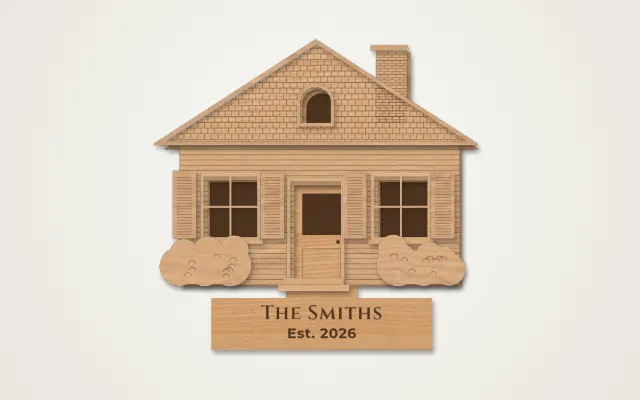
A photo of any home, shop, church, barn or cabin becomes a layered wooden portrait. AI finds the walls, roof, windows and doors, you fine-tune, and it stacks into 6 to 8 layers.
- Exports
- SVG, DXF, PDF, EPS
- Works with
- LightBurn, xTool Creative Space, Glowforge
- Materials
- Birch plywood, MDF, basswood
What it makes
The Building Portraits studio turns a photo of a real building into a layered wooden portrait. Upload a photo of a home, shop, church, barn or cabin, straighten it by marking the four corners of the front wall, and the AI traces the walls, roof, windows, doors and details. You fine-tune the shapes in the editor, and the studio stacks them into 6 to 8 layers with engraved wall textures, a frame and a name plaque.
The layers
| Layer | What it holds |
|---|---|
| Back panel | Engraved glass behind the windows, recessed doors |
| Walls | Siding, brick, stone, shingle or log texture with the openings cut out |
| Roof | Roof shape and chimneys |
| Trim | Window frames, sills, door frames and fascia |
| Details | Shutters, columns, railings, steps, awnings and signs |
| Frame and plaque | An optional frame with the family name or address |
How it works
- Upload a photo and mark the four corners of the front wall.
- Let the AI trace it, or start from one of ten building templates.
- Fine-tune in the editor: move, add or delete windows, doors and details.
- Check the finished look in real wood, then export the layers and the assembly guide.
Tips
- Shoot it straight. Stand across the street and take the photo square-on; the corner tool fixes small angles.
- Simplify small details. Tiny trim pieces are hard to glue. Keep details larger than about 3 mm.
- Paint first. Paint or stain each layer before gluing, then stack from the back.
- Price for the time it takes. Portraits are custom work; the price calculator includes your design time.
Only use photos you have the right to use. A photo you took yourself, or one the customer sends you of their own home, is fine.
Other photo tools
To engrave the photo itself instead of building layers, use the photo engraving generator. To turn a logo or drawing into cut lines, use image to SVG.
Questions
What kind of photo works best?
A straight-on photo of the front of the building in daylight. The studio lets you mark the four corners of the front wall to straighten a photo taken at an angle.
What does the AI do?
It finds the walls, roof, chimneys, windows, doors, columns, steps and shrubs in the photo and draws them as shapes. You can move, add or delete any part before cutting.
How many layers does it make?
Usually 6 to 8: a back panel, the walls with openings, the roof, trim around windows and doors, details such as shutters and railings, and an optional frame with a name plaque.
Who buys house portraits?
Home owners, couples who just moved in, and realtors who give them as closing gifts. Churches, shops and family cabins are popular too.
Can I paint the layers?
Yes. The studio shows a painting and assembly guide with a colour for each layer. Paint before you glue the stack together.
xTool, LightBurn, Glowforge are trademarks of their respective owners. Laser Generator Studio is an independent product and is not affiliated with or endorsed by them.