Handwriting Keepsake · Laser Generator Studio
Handwriting Engraving: Turn a Note or Recipe into a Keepsake
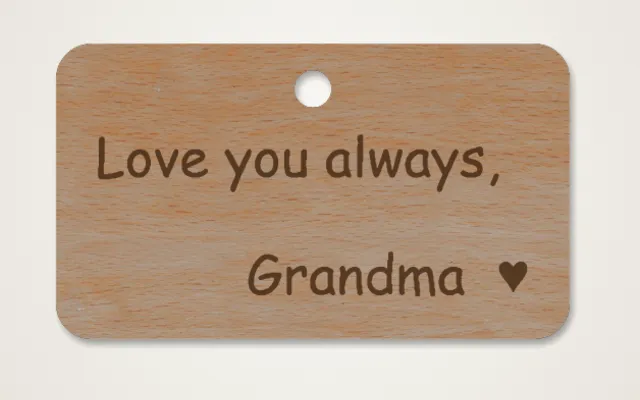
Photograph a handwritten note, card or family recipe: shadows and paper texture are cleaned away and the writing becomes a crisp engraving on a cutting board, plaque or ornament.
- Exports
- SVG, DXF, PNG
- Works with
- LightBurn, xTool Creative Space, Glowforge, LaserGRBL
- Materials
- Maple, walnut, bamboo, birch plywood, slate
What it makes
The Handwriting Keepsake studio turns a photo of real handwriting into a clean engraving. Snap a handwritten note, card or family recipe with your phone. The studio cleans away shadows and paper texture, keeps the strokes, and lays the writing out on a cutting board, plaque or ornament.
Ideas
| Keepsake | Best material |
|---|---|
| Family recipe cutting board | Maple, walnut or bamboo |
| Memorial plaque | Walnut or slate |
| Signature ornament | Birch plywood |
| Love note | Birch plywood or a wooden box lid |
How it works
- Take a photo of the writing, straight on and in good light.
- Crop and clean: the studio removes the paper and shadows.
- Choose the product and size.
- Export and engrave.
Tips
- Daylight works best. Avoid the flash; it causes glare on shiny paper.
- Light wood shows writing best. Maple and birch give the strongest contrast.
- For photos rather than writing, use photo to sketch.
Food safety: finish engraved cutting boards with a food-safe oil, and keep paints and sealers off the cutting surface.
Export
The writing exports as clean vector lines in SVG and DXF, or as a PNG at the exact size.
Questions
Can I use a phone photo?
Yes. Take the photo in good light, straight above the paper. The studio removes shadows, creases and paper texture.
What makes a good keepsake?
A family recipe on a cutting board, a note from a parent on a plaque, or a signature on an ornament. Memorial pieces with a loved one's handwriting are very popular.
Is an engraved cutting board food safe?
Engrave the back or a display side, or finish the board with a food-safe oil after engraving. Do not use a finish that is not food safe on a cutting surface.
What if the writing is faint?
Raise the Sensitivity and Line weight until the strokes are solid, then use Remove specks to clear stray marks.
Can I crop out part of the card?
Yes. Crop to the writing keeps only the inked area, and you can add an optional caption below it.
xTool, LightBurn, Glowforge are trademarks of their respective owners. Laser Generator Studio is an independent product and is not affiliated with or endorsed by them.