Color Hunt · Laser Generator Studio
Laser Colour Marking Test: Find Settings for Coloured Stainless Steel
Colour stainless steel and titanium with a fibre or MOPA laser: sweep any two settings in a labelled grid, click the square closest to your colour, refine around it and save the recipe.
- Exports
- SVG, DXF, CSV
- Works with
- EzCad, LightBurn, xTool Creative Space
- Materials
- Stainless steel, titanium
What it makes
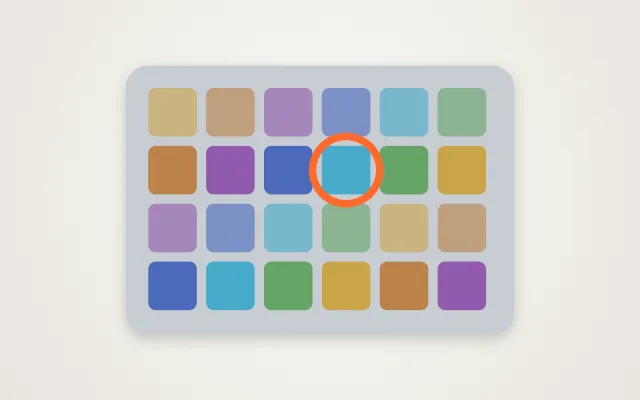
The Color Hunt studio finds laser settings for colour marking on stainless steel and titanium. It engraves a grid of labelled squares where two settings change step by step across the grid. You look at the result, click the square closest to the colour you want, refine around it, and save the settings as a recipe. It is built on the same idea as a test card, but made for the many settings that control colour on metal.
The settings you can sweep
| Setting | Effect on colour |
|---|---|
| Power | More energy, a thicker oxide, a different colour |
| Speed | Slower marks deliver more energy per spot |
| Frequency | Changes how the energy is spread |
| Pulse width | MOPA lasers only; one of the strongest colour controls |
| Line interval | Tighter lines give more even colour |
| Passes and focus | More passes or defocus can shift the shade |
How it works
- Choose your laser type and metal. Settings your laser does not have are hidden.
- Pick two settings to sweep and their ranges.
- Engrave the grid and compare the squares in good light.
- Click the closest square and press Refine for a finer grid around it.
- Save the recipe to My materials.
Tips
- Use the same metal every time. Brushed and polished stainless give different colours with the same settings.
- Let it cool. Hot metal colours differently; leave time between large grids.
- Look in daylight. Oxide colours shift with the angle and light.
- For black and white marks, a regular laser test card is quicker.
Results vary. Colours depend on your exact laser, lens, focus and metal. The studio helps you find your own settings; it cannot promise a colour from someone else’s numbers.
Export
The grid exports as one layer per square, split into files of up to 30 squares for laser software, with a CSV of every setting and a printable sheet. Read more in the stainless steel guide.
Questions
Which lasers can colour metal?
Fibre lasers, and especially MOPA fibre lasers, because you can change the pulse width and frequency. Some UV lasers can make colours too. Diode and CO₂ lasers cannot colour bare stainless steel.
Why do colours change from machine to machine?
The colour comes from a thin oxide layer whose thickness depends on the energy delivered, the lens, focus, the metal's finish and even its temperature. That is why you test on your own machine and metal.
What do the letters and numbers on the grid mean?
Each square is labelled like A1, B3 and so on. The settings table shows the exact values for every square, so you can copy the settings of the colour you like.
What does Refine do?
It makes a smaller grid with finer steps around the square you picked, so you can home in on the exact shade.
Where are my colour recipes saved?
In My materials, under the metal you tested, with the settings for each colour. You can run a new test around any saved recipe.
xTool, LightBurn are trademarks of their respective owners. Laser Generator Studio is an independent product and is not affiliated with or endorsed by them.