Tags & Marking · Laser Generator Studio
Asset and Valve Tag Generator: Numbered Tags with QR Codes
Numbered runs of valve, cable and service tags, patch-panel port strips, rack-unit strips, warehouse location plates with QR or Data Matrix codes, barcodes and asset tags.
- Exports
- SVG, DXF, PDF, EPS
- Works with
- LightBurn, xTool Creative Space, EzCad, Glowforge
- Materials
- Anodised aluminium, stainless steel, two-colour laminate, brass
What it makes
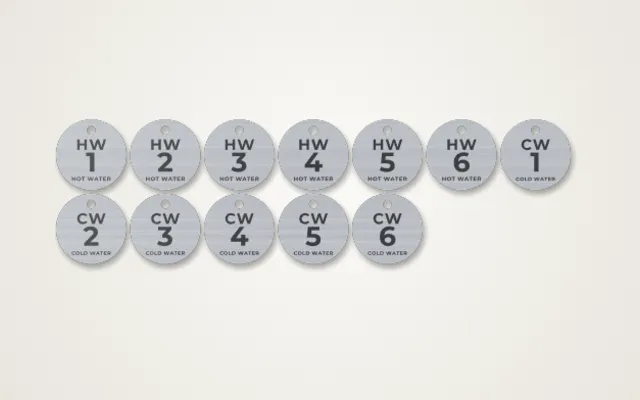
The Tags & Marking studio makes identification tags in numbered runs: valve tags for plumbing and heating, cable tags, service tags with a month and year punch grid, patch-panel port strips, rack-unit strips, warehouse location plates with Data Matrix or QR codes, barcodes, asset tags, data plates and breaker labels. It saves typing and checking hundreds of tags one by one.
Tag types
| Tag | Used for |
|---|---|
| Valve tags | Numbered tags for valves and pipework |
| Cable tags | Labels that wrap or hang on cables |
| Service tags | Equipment tags with a month and year punch grid |
| Port and rack strips | Patch-panel port numbers and rack-unit labels |
| Location plates | Warehouse shelf and bin plates with codes |
| Asset and data plates | Asset numbers, barcodes and equipment details |
| Breaker labels | Circuit labels for electrical panels |
How it works
- Pick a tag type.
- Number the run: type a range or paste a list.
- Add codes: QR or Data Matrix on each tag, and test one with your phone.
- Choose the shape, size and mounting: holes, slots or none.
- Export and engrave.
Tips for tags that last
- Pick the right material. Anodised aluminium marks white on colour with a diode or fibre laser; stainless steel needs a fibre laser or a marking spray. See the anodised aluminium and stainless steel guides.
- Test before the run. A test card on your tag stock finds the speed and power that give dark, readable marks.
- Keep codes big enough. 10 mm or more across for reliable scanning.
- Check the numbering. Proof the first and last tags of each sheet before engraving the whole run.
One-off codes: for a single QR code on a sign, menu or product, the QR code generator is quicker.
Export
Tags export with engraving and cut outlines on separate layers, in millimetres, ready for diode, CO₂ and fibre laser software.
Questions
How do I number a whole run of tags?
Type a range like V-001 to V-120, or paste a list. The studio makes one tag per number and lays them out on sheets for your bed.
Can each tag have its own QR code?
Yes. Every tag can carry a QR or Data Matrix code with its own number. Scan one from the screen with your phone before you engrave the run.
What is the service tag punch grid?
Service tags have a grid of months and years. After a service you punch or engrave the date, so anyone can see when the equipment was last checked.
Which material lasts longest?
Anodised aluminium and stainless steel survive heat, weather and cleaning. Two-colour laminate is cheaper and gives crisp contrast indoors.
How small can a code be?
Keep QR and Data Matrix codes at least 10 mm wide so phones and scanners read them easily, and test one before the full run.
xTool, LightBurn, Glowforge are trademarks of their respective owners. Laser Generator Studio is an independent product and is not affiliated with or endorsed by them.